
UPDATE 2 : BLUE VERSION OF THIS TEMPLATE IS AVAILABLE
UPDATE: PLEASE DOWNLOAD THE FILE AGAIN. I'VE REPLACE THE SCRIPTS WITH A NEW HOST. SORRY FOR THE BANDWIDTH BUG.
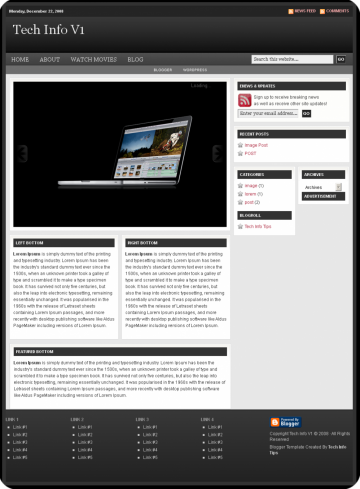
Finally after many months of blogging, understanding some of the HTML and CSS, I have successfully created a blogger template named Tech Info V1. Tech Info V1 is one of blogger template that I used and after a few months, I think I need to share this template to world. Before I begin, I would say something. Tech Info V1 is successfully created by me and I used some images from other template like the Revolution Church and some others that I can't remember. All of those templates I combine into this, a blogger template named Tech Info V1.This post is created to explain some tweak on how to customize this template.If you have some problems or suggestion please add a comment.So, without wasting any time, here is Tech Info V1.
You can download Tech Info V1 blogger template (it's a XML file that you can easily upload to your blogger blog) at the following link.
Preview Tech Info V1 Blogger Template
Download Tech Info V1 blogger template
PLEASE READ THIS FIRST
Tech Info V1 blogger template need some HTML or CSS knowledge to customize it correctly.Before to make changes on your actual Blogger template, save a copy of your template on your local hard disk, so, if something go wrong with the update, you can restore it. Take a mind, if you use custom Widgets on your actual Blogger template, they will be removed using this template. I'm not responsible for eventual problems.
Customizing the template
Change Your Favicon Logo
You can either want to use a favicon or not, If you want to use it, go to the <head> to find the codes and replace it with your own favicon
Configure the Navigation Bar
To customize Navigation Bar , find the following code and edit with your own link.
<div id='navbar'>Configure the Sub Navigation Bar
<ul id='nav'>
<li><a expr:href='data:blog.homepageUrl'>Home</a></li>
<li><a href='http://technoraz.blogspot.com/2007/12/about.html'>About</a></li>
<li><a href='http://technoraz.blogspot.com/search/label/movies'>Watch Movies</a>
<ul id='nav'>
<li><a href='http://technoraz.blogspot.com/2008/06/watch-incredible-hulk-online-free.html'>The Incredible Hulk</a></li>
<li><a href='http://technoraz.blogspot.com/2008/07/watch-wanted-online-free_03.html'>Wanted</a></li>
<li><a href='http://technoraz.blogspot.com/2008/07/watch-hancock-online-free.html'>Hancock</a></li>
</ul>
</li>
<li><a href='http://www.blogger.com'>Blog</a>
<ul id='nav'>
<li><a href='http://www.blogger.com'>Blogger</a></li>
<li><a href='http://www.wordpress.com'>Wordpress</a></li>
</ul>
</li>
</ul>
You can customize the sub navigation bar with your own links, just find the below codes
<div id='subnavbar'>The Featured Post Slideshow
<ul id='subnav'>
<li><a href='http://www.blogger.com'>Blogger</a>
<ul id='subnav'>
<li><a href='http://blogger-templates-tutorials.blogspot.com'>Blogger Templates and Tutorials</a></li>
<li><a href='http://wordpresstoblogger.blogspot.com'>Wordpress To Blogger</a></li>
</ul>
</li>
<li><a href='http://www.wordpress.com'>Wordpress</a>
<ul id='subnav'>
<li><a href='http://www.wpskins.org'>WPSkins</a></li>
<li><a href='http://www.wordpressthemepark.com'>WordpressThemePark</a></li>
</ul>
</li>
</ul>
</div>
You can customize the slideshow to show up your featured post in your blog. This may be a difficult customization. If you have any problem just contact me via mail (address at the sidebar) or add comment.
<div id='content'>Customize the Enews & Updates sidebar
<div id='homepage'><div class='clear'/>
<b:if cond='data:blog.url == data:blog.homepageUrl'>
<div id='homepagetop'>
<div class='featuredtop'>
<div id='myGallery'>
<div class='imageElement'>
<h2>Introducing the all-new MacBook and MacBook Pro.</h2>
<p>Introducing the all-new MacBook and MacBook Pro. New design. New features. New technologies. All engineered to standards that don’t even exist yet..</p>
<a class='open' href='http://technoraz.blogspot.com/2008/10/introducing-all-new-macbook-and-macbook.html' title='Read More'/>
<img class='full' src='https://blogger.googleusercontent.com/img/b/R29vZ2xl/AVvXsEh32njh2PcHS0GY6P95D1dH-Iz4Eb1M3Xv3UqX-_sQSe0Sp8C3RA52VqUJgO4lL1JFS7nlVyh7lU_Sh_YYkqzUGmDp6bqxq7ZdHoiVCs_zAGvXIUO1I0kt7pNodaCwWVaZHWEbt8h6Ak6Y/s400-r/overview-gallery1-20081014b.png'/>
<img class='thumbnail' src='https://blogger.googleusercontent.com/img/b/R29vZ2xl/AVvXsEh32njh2PcHS0GY6P95D1dH-Iz4Eb1M3Xv3UqX-_sQSe0Sp8C3RA52VqUJgO4lL1JFS7nlVyh7lU_Sh_YYkqzUGmDp6bqxq7ZdHoiVCs_zAGvXIUO1I0kt7pNodaCwWVaZHWEbt8h6Ak6Y/s400-r/overview-gallery1-20081014b.png'/>
</div>
<div class='imageElement'>
<h2>8 Easy Ways To Make Your XP Look Like Vista</h2>
<p>The Released Vista had make many computer users amazed by it's appealing look and it's great features that can make their work easily. There many tutorials to make your XP look like Vista and this is one of them. So, here is the 8 Easy Ways to turn you old XP look to a fine Vista look!</p>
<a class='open' href='http://technoraz.blogspot.com/2008/11/8-easy-ways-to-make-your-xp-look-like.html' title='Read More'/>
<img class='full' src='https://blogger.googleusercontent.com/img/b/R29vZ2xl/AVvXsEi7Onc8FIFGgcklYckeXzfTFsU0M4IZTSGqs0AC1Q-IQtw7Cwo-fEq4msZnrYTV8fZ8MBErHH_K3zkBDtlw_fSXKOoHCLblQSRbLVL1XpwwuMDyEdLBQisBWm5Tib5GLrhZHj92oG6WIRk/s800/xp-to-vista-1.jpg'/>
<img class='thumbnail' src='https://blogger.googleusercontent.com/img/b/R29vZ2xl/AVvXsEi7Onc8FIFGgcklYckeXzfTFsU0M4IZTSGqs0AC1Q-IQtw7Cwo-fEq4msZnrYTV8fZ8MBErHH_K3zkBDtlw_fSXKOoHCLblQSRbLVL1XpwwuMDyEdLBQisBWm5Tib5GLrhZHj92oG6WIRk/s800/xp-to-vista-1.jpg'/>
</div>
<div class='imageElement'>
<h2>Best Vista-Look-Alike XP Themes</h2>
<p>These XP theme is the most beautiful Vista-look alike XP Themes. All XP themes here doesn't need any third part software just DOWNLOAD AND EXTRACT TO C:\WINDOWS\Resources. Happy Trying!</p>
<a class='open' href='http://technoraz.blogspot.com/2008/09/best-vista-look-alike-xp-themes.html' title='Read More'/>
<img class='full' src='http://i71.photobucket.com/albums/i149/shankarganesh/VistaVG-1.jpg'/>
<img class='thumbnail' src='http://i71.photobucket.com/albums/i149/shankarganesh/VistaVG-1.jpg'/>
</div>
<script type='text/javascript'>
function startGallery() {
var myGallery = new gallery($('myGallery'), {
timed: true
});
}
window.addEvent('domready', startGallery);
</script>
</div>
You can customize the enews and updates sidebar by entering your Feedburner feed account id in the template. Just find these words YOUR FEEDBURNER ID and replace it with your feedburner id.
<form action='http://www.feedburner.com/fb/a/emailverify' id='subscribe' method='post' onsubmit='window.open('http://www.feedburner.com/fb/a/emailverifySubmit?feedId=YOUR FEEDBURNER ID', 'popupwindow', 'scrollbars=yes,width=550,height=520');return true' style='border:1px solid #fff;padding:0px;text-align:left;' target='popupwindow'>The Footer Section
<input id='subbox' name='email' onblur='if (this.value == "") {this.value = "Enter your email address...";}' onfocus='if (this.value == "Enter your email address...") {this.value = "";}' style='width:160px' type='text' value='Enter your email address...'/>
<input name='url' type='hidden' value='http://feeds.feedburner.com/~e?ffid=YOUR FEEDBURNER ID'/>
<input name='title' type='hidden' value='Subscribe To Feed'/>
<input name='loc' type='hidden' value='en_US'/>
<input id='subbutton' type='submit' value='GO'/>
</form>
You can customize the footer section by changing it with your own links. There is 5 footer section in this template and 1 of them are used for the credits (You are not allowed to change the credits)
<div id='footerbg'>
<div id='footer'>
<!--Replace the # below with the destination url.-->
<div class='footer1'>
<h4>Link 1</h4>
<ul>
<li><a href='#'>Link #1</a></li>
<li><a href='#'>Link #2</a></li>
<li><a href='#'>Link #3</a></li>
<li><a href='#'>Link #4</a></li>
<li><a href='#'>Link #5</a></li>
</ul>
</div>
<!--Replace the # below with the destination url.-->
<div class='footer2'>
<h4>Link 2</h4>
<ul>
<li><a href='#'>Link #1</a></li>
<li><a href='#'>Link #2</a></li>
<li><a href='#'>Link #3</a></li>
<li><a href='#'>Link #4</a></li>
<li><a href='#'>Link #5</a></li>
</ul>
</div>
<!--Replace the # below with the destination url.-->
<div class='footer3'>
<h4>Link 3</h4>
<ul>
<li><a href='#'>Link #1</a></li>
<li><a href='#'>Link #2</a></li>
<li><a href='#'>Link #3</a></li>
<li><a href='#'>Link #4</a></li>
<li><a href='#'>Link #5</a></li>
</ul>
</div>
<!--Replace the # below with the destination url.-->
<div class='footer4'>
<h4>Link 4</h4>
<ul>
<li><a href='#'>Link #1</a></li>
<li><a href='#'>Link #2</a></li>
<li><a href='#'>Link #3</a></li>
<li><a href='#'>Link #4</a></li>
<li><a href='#'>Link #5</a></li>
</ul>
</div>
<!--Replace the # below with the destination url.-->
<div class='footer5'>
<p><a href='http://www.blogger.com'><img src='http://www.blogger.com/buttons/blogger-powerby-blue.gif'/></a></p>
<p>Copyright <data:blog.title/> © 2008 · All Rights Reserved </p>
<a href='http://creativecommons.org/licenses/by-nd/2.5/my/' rel='license'><img alt='Creative Commons License' src='http://creativecommons.org/images/public/somerights20.png' style='border-width:0'/></a>
</div>
</div>
</div>
Preview Tech Info V1 Blogger Template
Download Tech Info V1 blogger template
Ok, that's for now, I will updated this post if there any changes. So, ff you have any problem just contact me via mail (address at the sidebar) or show your problems via comment. Share This Post Stay updated and get latest news and tips or tutorials on technology by subscribing to our feed or you can always get it be delivered to your mail inbox.


nice templates!
maybe i will use your templates someday..
@Flip9
Thanks! I'm sure that you'll use my template someday!
i want to use this template
but, there is problem
What's Your Problem? Please do comment to tell your problem or just mail me(address at the sidebar)
i'm using blogger. i used this template. tapi, di page elements, tak teraturlah. tak nampak widgets. tolonglah saya. u try to register a blog in blogger. then, use this template. then see at page elements.
kalo ade idea, untuk membetulkannya, tolong emel ke
rethna30@hotmail.com
how did u put stat tracker. in my site there is only links. how to change them
i've sent an email to you..
this theme is great!
im using it right now
@rethna30, I've sent you an email regarding your question
@Flip9, great blog although it's still new, just keep up the great work!
Dude, this theme should credit to http://www.revolutiontwo.com
Wow. cool template. thanks for change the look and configure in your own way. really you have some unique thinking. i love it.
wao
hello, i love this templates i want to use this templates in my just start blog http://historyofrockers.blogspot.com/
but there is problem. just visit that link it is not like the preview one. looking for ur reply
I have start my new blog http://history of rockers its totally new i can customized all. but i don' have idea about --The Featured Post Slideshow
I want to make front page like yours dividing each parts into several columns. HElp me
hey when i download the template again. it doesn't work it show some error
@saugat Adhikari-What error did you get? I've downloaded the template and uploaded to my blog again but I don't find any problems. My it's your browser bugs. Try clearing your cache and cookies then upload the template.
ya that my be because of cookies and cache its ok now. thanks for the templates. but its really hard to customized post sideshow. i hope i will learn someday about that. what we have to do to delete the post slideshow.
Thanks, For Build This Template
I like this theme very much...
But I don't know the customization involved in this ...
Can you help me?
And can I know whether u are in any social networking sites?
It's look bad on IE 7.
Can you fixed it and make it excactly look like Revolution Church Theme by Brian Gardner?
It's will be nice if you can do that.
:)
awesome man but i dont know how to add posts to a particular link like about,home etc plz if anybody can help send a mail to me at ashish.Sathyan.S@gmail.com
keren bro
thanks i like your templates .. if you want see visit http://www.kaybolmusmasumiyet.com thanks again.
Very good job!!!
Could you add only the "blog post section" in homepage?
Greetings from Bulgaria.
i need to use dis template.. bt i dont want certain features. can u help me wid dat.. i hav a rough idea abt look n features..i can send dat rough design to u...
serjas
rahmanism.com
Wei download link dead la....
hi,
is der any way to use "The Featured Post Slideshow" alone in my blog? pls reply me!
hello m from mp3crunch.blogspot.com i am using ur templates. it was going well but it so errors to robots.txt when i submit sitemap to google. can this problem be solved. pls mail for mp3crunch@gmail.com. Thank you
Post a Comment